

Click to add text
 Add heading
Add subheading
Add heading
Add subheading
 Add a little bit of body text

 Add curved text
Add heading
Add subheading
Add a little bit of body text
Add curved text
Free Drawing
Esc = Zeichenmodus beenden.
Choose
{{Pencil}}
Brush color
Default palette
Default palette
Color palette
You need to be logged in to upload images!
Click or drop images here
Accept file types: png, jpg, svg
Max file size: {{settings['nbdesigner_maxsize_upload']}} MB
Min file size: {{settings['nbdesigner_minsize_upload']}} MB
Max upload files: {{settings['nbdesigner_max_upload_files_at_once']}}
Clear all uploaded images
You need to be logged in to upload images!
Click or drop images here
Accept file types: png, jpg, svg
Max file size: {{settings['nbdesigner_maxsize_upload']}} MB
Min file size: {{settings['nbdesigner_minsize_upload']}} MB
Max upload files: {{settings['nbdesigner_max_upload_files_at_once']}}
Clear all uploaded images
webcam
Facebook
-
{{settings.nbdlangs[layer.type]}}
- Mask
-
Document colors
Default palette
Color palette
No Fill
{{(settings.product_data.product[$index].product_width-settings.product_data.product[$index].bleed_top_bottom*2) + ' ' + settings.nbdesigner_dimensions_unit}}
{{(settings.product_data.product[$index].product_height-settings.product_data.product[$index].bleed_left_right*2) + ' ' + settings.nbdesigner_dimensions_unit}}
LEGEND PAGE BOUNDARIES
PRINT AREA
This line indicates the edge of the printing area and in most cases the final size of your product.
SAFETY DISTANCE
To ensure that images, text and other design elements are not cut off, it is important to maintain an additional safety distance from the edge of the printing area.
CUT
The area between the printing area and this contour shows the bleed area.
Backgrounds that fill the frame or elements that extend to the edge of the page should fill this area completely to avoid white flashes.
{{(settings.product_data.product[$index].product_height-settings.product_data.product[$index].bleed_left_right*2) + ' ' + settings.nbdesigner_dimensions_unit}}
{{stages[currentStage].states.boundingRealSize.size}}
Drop to replace
X: {{stages[currentStage].states.coordinates.left}}
Y: {{stages[currentStage].states.coordinates.top}}
Y: {{stages[currentStage].states.coordinates.top}}
{{stages[currentStage].states.rotate.angle}}
{{defaultStageStates.tlsArray.length+defaultStageStates.slwArray.length}}
IMAGE RESOLUTION CHECK
THE RESOLUTION OF THE IMAGE FILE IS:
{{defaultStageStates.tlsDPI}} DPI
Everything is in the green zone!
The resolution of this image file is high enough,
to achieve good print quality.
THE RESOLUTION OF THE IMAGE FILE IS:
{{defaultStageStates.tlsDPI}} DPI
The resolution of the image is still sufficient.
The selected image may be slightly blurred when printed
works.
THE RESOLUTION OF THE IMAGE FILE IS:
{{defaultStageStates.tlsDPI}} DPI
The resolution of the image is too low!
We recommend you choose a picture with higher
resolution to upload.
PRINT RESOLUTION TOO LOW
One or more of the elements placed in the design
Images have a lower resolution than the
recommended {{defaultStageStates.requiredDPI}} dpi. These images can be found in
Print may appear slightly blurred.
One or more of the elements placed in the design
Images have insufficient resolution.
To achieve a good print result,
should these be replaced by higher resolution motifs
replaced or scaled down.
-
{{settings.nbdlangs[layer.type]}}
- Mask
-
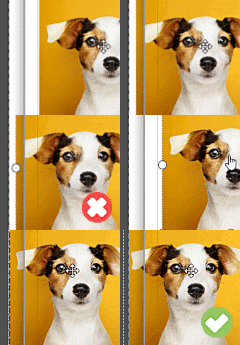
AUFLÖSUNG
{{defaultStageStates.tlsDPI}} DPI
ANSCHNITT BEACHTEN
Image Low Resolution
Share this design
- Keyboard shortcuts
- About
| Ctrl +A | Select all layers |
| Ctrl +D | Deselect all layers |
| Ctrl +E | Clear all layers |
| Ctrl +C | Copy layer |
| Ctrl +X | Cut layer |
| Ctrl +V | Paste layer |
| Ctrl +Z | Undo changes |
| Ctrl +Y | Redo changes |
| Ctrl +L | Show/hide Bleed line |
| Ctrl +R | Show/hide Ruler |
| Ctrl +H | Align layer horizontal center |
| Ctrl ++ | Zoom In stage |
| Ctrl +- | Zoom Out stage |
| Ctrl +0 | Fit stage with viewport |
| Ctrl +1 | Resize stage to real size |
| Ctrl +] | Bring layer forward |
| Ctrl +[ | Bring layer backward |
| Ctrl +O | Load your designs |
| Ctrl +B | Make your text bold |
| Ctrl +I | Italicize your text |
| Ctrl +G | Group layers |
| Ctrl +P | Duplicate layers |
| Alt +U | Make your text UPPERCASE |
| Alt +L | Make your text lowercase |
| Alt +← | Move the selected layers to left 1px |
| Alt +→ | Move the selected layers to right 1px |
| Alt +↑ | Move the selected layers to top 1px |
| Alt +↓ | Move the selected layers to bottom 1px |
| Alt + | Free transform |
| Shift ++ | Zoom out selected layers |
| Shift +- | Zoom in selected layer |
| Shift + | Centered scaling |
| ← | Move the selected layers to left 10px |
| → | Move the selected layers to right 10px |
| ↑ | Move the selected layers to top 10px |
| ↓ | Move the selected layers to bottom 10px |
| Delete | Delete selected layers |
| Esc | Quit text editing |
| Alt +Shift +G | Show/hide Grid |
| Alt +Shift +D | Show/hide stage dimensions |
| Alt +Shift +L | Delete all policies |
| Ctrl +Shift +] | Bring layer to front |
| Ctrl +Shift +[ | Send layer to back |
| Ctrl +Shift +V | Align layer vertical center |
| Ctrl +Shift +I | Import Design |
| Ctrl +Shift +E | Export Design |
| Ctrl +Shift +S | Save Design for later |
| Ctrl +Shift +O | Load Your Design in Cart |
| Ctrl +Shift +G | Ungroup |
| Ctrl +Shift +L | Clear all stages |
| Ctrl +Shift +B | Disable drawing mode |
| Ctrl +Shift +Z | Enable drawing mode |
| Ctrl +Shift +< | Decreate font size |
| Ctrl +Shift +> | Increate font size |
Web to Print
Copyright © 2026. Web to Print
All Rights Reserved
Image upload terms
By uploading your image data, you confirm that you are the rights holder.
You also agree that your image data may be stored on our server and processed by employees of our company.



 DRUCKDATEN-CHECK

IHR DESIGN IST NOCH NICHT GANZ DRUCKREIF!
Folgende Probleme sind uns aufgefallen:

{{defaultStageStates.tlsArray.length}}
Bilder in unzureichender Auflösung

{{defaultStageStates.slwArray.length}}
Objekte ohne ausreichenden Anschnittt
Wir bitten Sie diese Mängel zu beheben, da es im Druck sonst zu unerwünschten Ergebnissen kommen kann.
Delete All Layers
Are you sure you want to delete all layers?
Delete Selected Stage
Are you sure you want to delete selected stage?
Clear All Stages
Are you sure you want to clear all stages?
Replace stage content
By selecting another template you are deleting all the content on the current stage. To restore, click Undo button.
Crop image
Guidelines
Cut Line
This is where we aim to trim the product. The actual line can vary due to the trimming process.
Safe zone
Keep text and important imagery within this line to ensure it does not get cut off during trimming.
My design
Save as new designs or overwrite last design
New design
My designs
My designs in cart
Grid View
{{$index + 1}}
Warning
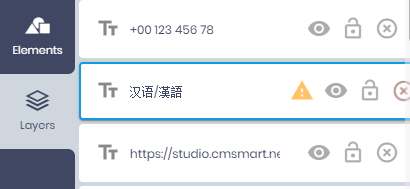
Some fonts you have chosen can not show some of the text you have added. Please choose fonts that is compatible with your language.
Go to <b>Layers tab</b>, check all layers have the exclamation mark:
Your Information
All changes saved
- Double click to edit text
- Right click on selected layers to show context menu
Drag & drop image from sidebar into shape layer to replace the current image.

- Double click masked photo to turn on mask editing mode.
- Click Apply mask icon or click outside selected mask to turn off mask editing mode.
Document colors
Default palette
Color palette
No Fill
FLÄCHE
VERLAUF
VERLAUFS-ART:
